
Archive
This post is archived and may contain outdated information. It has been set to 'noindex' and should stop showing up in search results.
This post is archived and may contain outdated information. It has been set to 'noindex' and should stop showing up in search results.
How To Enable Adblock in Chrome Incognito Mode (Private Browsing)
Dec 23, 2011Web and InternetComments (6)
By default Google Chrome disables your extensions for Incognito windows. This is in general a good practice since extensions can collect and store private data. However, it can be particularly irritating to not have an ad blocker enabled. Full-screen popups, flashing banner ads, "fake" links littered throughout a text document, and other horrors.
Luckily, you can quickly enable your extensions in Incognito mode by going to Tools -> Extensions from the menu button and clicking the "Allow in incognito" checkbox next to the extensions you want:
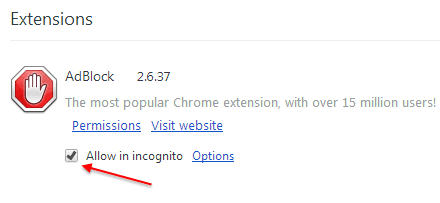
uBlock, AdBlock, and AdBlock Plus can be enabled for Incognito mode in this way.
Luckily, you can quickly enable your extensions in Incognito mode by going to Tools -> Extensions from the menu button and clicking the "Allow in incognito" checkbox next to the extensions you want:
uBlock, AdBlock, and AdBlock Plus can be enabled for Incognito mode in this way.