
Link To A Specific Time In A YouTube Video
Jan 26, 2018Web and InternetComments (16)
You can link to a specific part of a YouTube video, so that upon visiting the URL you are taken directly to that time, three different ways:
Method 1
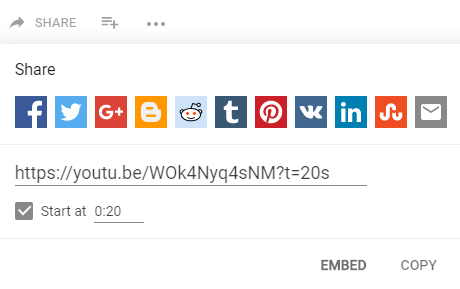
The first is using the Share button on the video page, which will prompt you with a "Start at" selection. It amends the share URL with the query string needed to start at the specific time.
Method 2
The second option is adding the query string yourself. If you're using the shortened YouTube share link (youtu.be), you'd add it like either of these URLs (the minutes are optional if you're linking to a time that is less than a minute):
If you're using the full YouTube URL, you would add it like this:
Method 3
The third option is adding a fragment identifier to the URL (# sign). It's similar to the query string, though does not appear to work in current versions of Firefox.
Method 1
The first is using the Share button on the video page, which will prompt you with a "Start at" selection. It amends the share URL with the query string needed to start at the specific time.
Method 2
The second option is adding the query string yourself. If you're using the shortened YouTube share link (youtu.be), you'd add it like either of these URLs (the minutes are optional if you're linking to a time that is less than a minute):
https://youtu.be/WOk4Nyq4sNM?t=0m20s
https://youtu.be/WOk4Nyq4sNM?t=20s
If you're using the full YouTube URL, you would add it like this:
https://www.youtube.com/watch?v=WOk4Nyq4sNM&t=0m20sMethod 3
The third option is adding a fragment identifier to the URL (# sign). It's similar to the query string, though does not appear to work in current versions of Firefox.
https://www.youtube.com/watch?v=WOk4Nyq4sNM#t=0m20s
https://youtu.be/WOk4Nyq4sNM#t=0m20s